
What you will find here
Explore approaches to communicating with a project team and adapting interactions to the preferences discussed in this article.
When we talk about project management, many companies usually care mainly about the project schedule and how they will control the activities, but sometimes they forget a key item for any project: how to establish a efficient communication with Project team?
In this article we will talk about how to use more efficient communication with the project team and how to extract the maximum from your team so that it can generate the results expected by your company.

According to the best management practices described in PMBOK, it is recommended that the project manager manages the 10 areas of knowledge (integration, scope, schedule, costs, quality, resources, communications, risks, acquisitions and stakeholders) throughout the project. Many problems that occur in companies and consequently in their projects are linked to communication failure with the project team.

As much as the company has an efficient system for registering project information, the execution of activities will always depend on the people and the communication ability of the project manager to engage people and make efficient communication implemented with all stakeholders of the project.
In most projects, the project manager is responsible for team management and, rather than transmitting information to the team, he needs to know how to transmit it so that everyone understands it and knows exactly what needs to be done.
Based on the principle that people are different, then the way each one “capt” and understands information is also different and knowing how to transmit information can make all the difference for the understanding and execution of activities for the work team.
01How to identify your team preferences?
There are several ways for the project manager to identify the profile of each member of his team and adjust his language according to the preferences of each proficient. One way to adapt your language to be better understood is to identify in your team if they have preferences visual, hearing or kinesthetics.

The person with visual preference usually uses visual words in their communication and can say something like “it’s not clear to me”, “I don’t see the light of this situation”, “I need to show you a problem”, “I had an insight” or “I want to illustrate this idea”. Briefly, a person with visual preference will most often use visual words to describe an idea, problem or even to present a solution.

On the other hand, there are people who have the auditory preference, who prefer to talk, "listen a lot about the situation", "listening to what is happening", because sometimes it seems that things are not "sounding well for them". When you need to transmit some information to these people, be prepared to speak and use words that are related to sounds such as tuned, sound, noise, etc.

And finally, there are people with kinesthetic preferences, who can better understand when words like “getting, “touching”, “feeling”, “passing over problems”, “hand in the dough”, among others are used.
For these people, the activities need to “make sense” or fit in because they can perform the tasks without doubt regarding the activities to be performed. In addition, these professionals demonstrate greater skill for manual activities, because they are naturally easy to perform activities of this nature.
There is no better or worse, right or wrong characteristic, but it is possible to use the characteristics of people to, whenever possible, assign tasks where they can use these characteristics in activities that are related to their preference. For example, in a report validation work, a professional with visual preference may be easier to identify divergences, formatting problems or even inconsistent values.
On the other hand, a professional with hearing preference may be responsible for writing down everything that was spoken and agreed in a meeting, as it may be easier to listen to everything carefully.
In the case of professionals with kinesthetic preferences, as mentioned above, whenever possible assign to them activities involving manual skills.
02Communicating with the team
One of the main roles of the project manager, in addition to taking care of the project as a whole, is to know how to communicate and, knowing that the teams are composed of different people, to know how to apply in practice this adjustment in communication can make all the difference to improve communication within the project.
It will be up to the project manager, identify the profile of each member of his team and adjust his language so that everyone can understand the information and thus perform their activities reducing doubts, “noise in communication”, points that were not “clear” and feeling that the project is moving in the right direction.
03Viewing the allocation of your team
Considering that communication is flowing during the project, the project manager can turn his attention to the systemic part of the project, controlling the schedule, allocation of resources, costs or scope of the project.

MLPro offers solutions that allow you to better visualize information so your company can manage your projects.
One of the reports developed by MLPro makes it possible to verify the analysis of capacity of resources, where it is possible to check synthetic or analytical information per year, month, department, resource or by project.
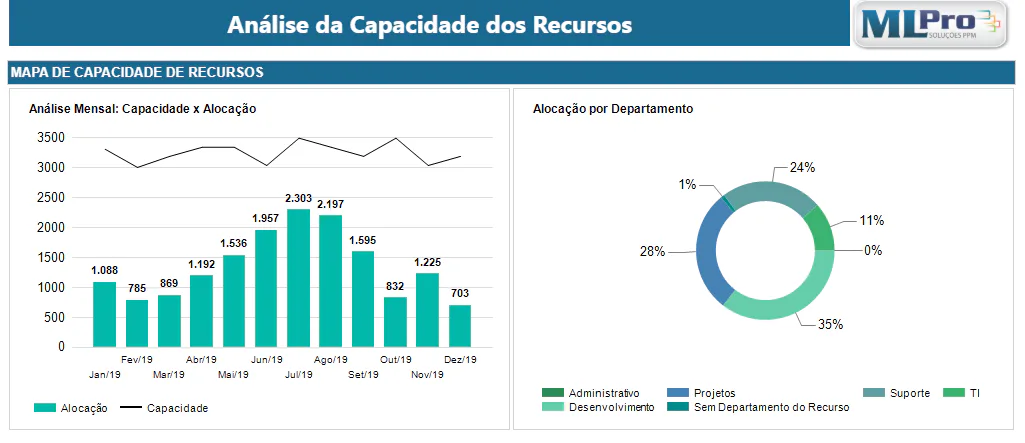
With this report, the project manager has full visualization of the allocation of project resources, and can thus make the best decisions quickly and practically based on easy-to-view information.
Therefore, if your company needs reports to view the allocation of your projects' resources, please contact us and learn how MLPro solutions can help make more efficient management of your company's resources.
Original content from the MLPro editorial library, fully preserved and translated for the English website.
