
What you will find here
Explore task dependency types in Planner Premium and the scheduling considerations covered in this MLPro walkthrough.
In this article we will talk about one of the novelties in Project for the Web in March, the new functionality of advanced task dependencies!
Now you can link tasks within a project using advanced dependency types such as Start-to-Start, End-to-Term, Start-to-Term and, of course, the End-to-Start pattern that is already allowed.
For those not initiated, the types of dependency allow linking the start and end dates of the task as dependent on any of the start or end dates of the other task in the project.
01Why do your projects delay because of dependencies?
Managing task dependencies effectively is one of the pillars to ensure that the project schedule is realistic, executable and reliable. However, many project managers end up facing delays, overlapping activities and misalignment between teams because they do not properly configure the links between tasks in the Microsoft Project. This compromises the visibility of PMO and makes strategic decision making difficult.
02Accessing dependencies
- You can access dependency settings in Grid view in columns "Depends on" and "Depends on"
- You can also view advanced dependencies in Timeline display mode:
- Or they can be added or edited in the "Add dependency" section of the task details editor:
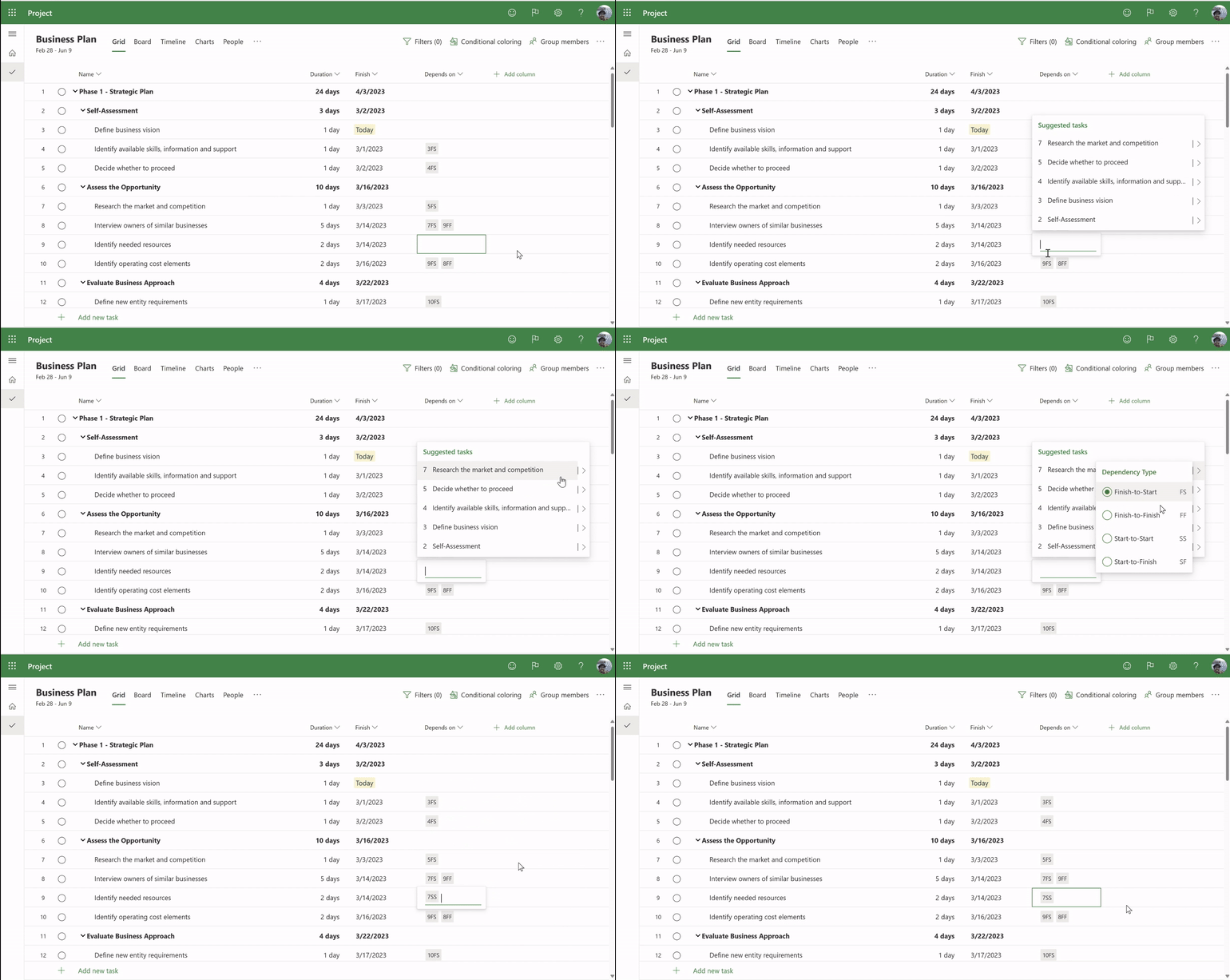
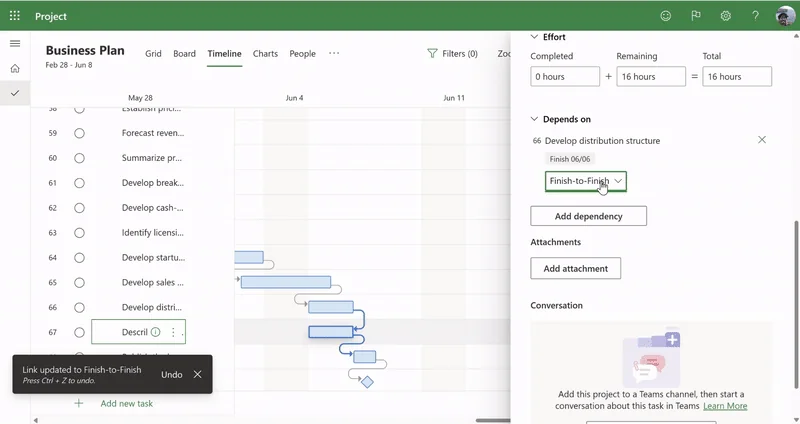
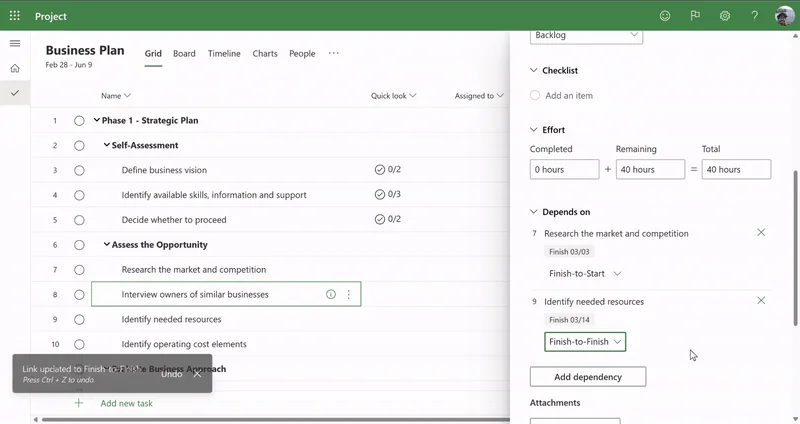
All Project for the Web users can create the default: Dependency End to Start. However, only users with Plan 3 and Plan 5 licenses can create advanced dependencies (II, TT, IT). Plan 1 users can display advanced dependencies on tasks in Grid/Time Line display mode, but do not create them.
03How to use dependencies
Consider two tasks, A and B. By linking the two tasks with dependencies, we will consider the task As the predecessor and task B will be the successor which means that to start Task B, it will be necessary to finish Task A.
The predecessors help the project manager in planning and building the project schedule, organizing the sequencing of project activities.
- End to start (IT)
The standard of the tool is to consider predecessors as IT, that is, for the activity to be started it will be necessary that the previous task be completed.
- From start to start (II)
In this case, the tasks A and B will be initiated simultaneously.
- End of Term (TT)
In this case, the tasks must end at the same time.
- Start to Finish (IT)
We use this predecessor bond when the project requires that the tasks be calculated from the end to the beginning (in the case of launching a rocket for example). In this case the predecessors will also be reversed. This type of predecessor is rarely used in projects.
Important: Since these features are still evolving in Project for the Web, it is noteworthy that there are some characteristics that it still does not adequately meet when working with some types of predecessors. If in the project there are predecessors of the Finish-Start type + 2 days, Project for the Web will not consider the start after the two days.
In the example below we have a predecessor 1TI+2d (end start + 2 days) and the activity “Realize Y” should start on 14/04/2023.
When importing the project to Project for the Web, note that the relationship between the predecessors was changed (did not consider the two days after the previous activity ended) and with this the start date is different from the original schedule.
04New: advanced dependencies in Project for the Web (Planner Premium)
In March 2025, Microsoft released a significant update on Planner Premium, which now allows for the creation of advanced dependencies between tasks. This was a feature long awaited by users who sought more control in the sequencing of activities.
As we know, Project for the Web is generally used for simpler projects that require a more agile methodology and do not require such robust control of tasks and projects. In this case, we recommend that before importing projects from your desktop to Project for the Web, analyze whether there are registered predecessors as example above so that project does not get different start and end dates from the original file.
05Beware of importing schedules: not everything comes right
Let's assume that a task has a predecessor configured as IT + 2 days (the next task should start two days after the previous one). Currently, the Project for the Web it does not recognize this additional delay, starting the next task immediately after the end of the predecessor, disregarding the defined logic.
This problem mainly affects users who import Project Desktop schedules to Project for the Web, as scheduling rules are not fully compatible. As a result, start and end dates can be changed automatically, causing inconsistencies in planning.
06Use new types of dependency on your behalf
The new functionality of advanced dependencies in Project for the Web is an important step towards increasing planning maturity in more agile and collaborative projects. However, it is essential that the project manager understands its current limits and knows how to interpret the schedule behavior to avoid distortions.
If you need support to structure your schedules or want to empower your team to safely use Project for the Web, talk to MLPro. We are experts in deployment, training and support in Microsoft Project, Planner and Power BI.
So, did you like the news? If you have any questions, talk to our team, we can provide an expert to take your questions out and explain how we can help with the Project Onlin deployment, training and support process. Click on the following link: Schedule a presentation.
Original content from the MLPro editorial library, fully preserved and translated for the English website.
