
What you will find here
Explore how Planner Premium tasks appear in the Assigned to me view alongside tasks in Microsoft Planner and To Do.
We are pleased to announce the launch of synchronisation of tasks of the Project for the Web (Planner Premium) with Microsoft Planner and To Do. With this, users will be able to view their tasks from Project for the Web perfectly integrated into the "attributed to me" view.

The feature is being launched in stages and will be available to everyone soon.
01The View “Assigned to me”
The display mode Assigned to me in Mine Tasks in the application Planner provides users with a consolidated display of their tasks spread across Tasks, Outlook, Meeting Notes, Loop and Planner. This is changing now, Project for the Web tasks are also being added to the view Assigned to me in My tasks at Planner.
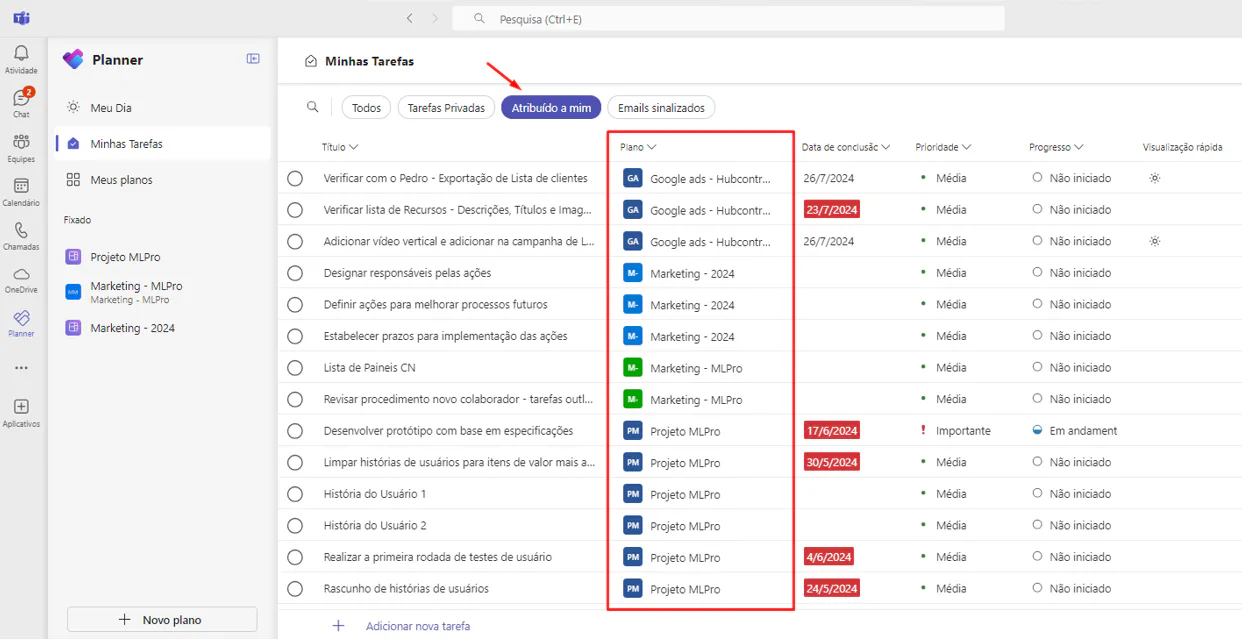
02How to access
How can I access my Project for the Web tasks in Planner and To Do?
All users with Microsoft 365 licenses are already equipped to access the Planner Project for the Web tasks assigned to them in the display "Assigned to me" at Planner and To Do. The feature is being distributed in stages in the coming weeks, if you still do not see the premium plan tasks in the display Assigned to me, wait until the moment the feature is launched for your user.
All tasks of Project for the Web that you create after the feature has been deployed to your user will automatically sync with display mode Assigned to me.
What does this mean for the user?
All your chores in one place. The "Assigned to Me" preview provides a centralized interface to manage your Project for the Web tasks along with other Microsoft 365 tasks. You can not only see the tasks of Project for the Web, but also update the progress of the task and mark it as completed directly in the view Assigned to me.
And if you are interested and want a presentation of our products, feel free to schedule an appointment with us at the following link: Microsoft PPM Easy Presentation
Original content from the MLPro editorial library, fully preserved and translated for the English website.
