
What you will find here
Review the comparison of web-based project planning, now part of Planner Premium, and Project Online in the MLPro archive.
With the launch of Project for the Web, some companies began to wonder about the feasibility of using only this version instead of using Project Online.
To clarify this question, in this article we will provide more information on the two versions of the Project and its respective characteristics.
01Comparative table
To facilitate the visualization of the information, we create a comparative framework with the main features of each version:
| Characteristics | Project for the Web | Project Online |
|---|---|---|
| Project editing control | Yes | Yes |
| Timeline Control | Yes | Yes |
| Task control | Yes | Yes |
| Task dependency control | Yes | Yes |
| Integration with Power BI for reporting | Yes | Yes |
| API resources for developers | Yes | Yes |
| Risk control and problems | Yes | Yes |
| Resource management* | Yes | Yes |
| Financial management* | Yes | Yes |
| Allows migration from a local schedule (.MPP file) to a corporate environment | No, no, no. | Yes |
| Microsoft Project Professional Timetable Control | No, no, no. | Yes |
| Full GED control for project documentation control | No, no, no. | Yes |
| Project SharePoint Site | No, no, no. | Yes |
| Advanced project management (baselines, critical path) | No, no, no. | Yes |
| Program and portfolio management | No, no, no. | Yes |
| * It is not so complete in Project for the Web, but there is the possibility of doing so. |
02Project for the Web
The Project for the Web features a more user-friendly, intuitive navigation and is currently a simplified version of Project Online, and in future it can be the main version of the product.
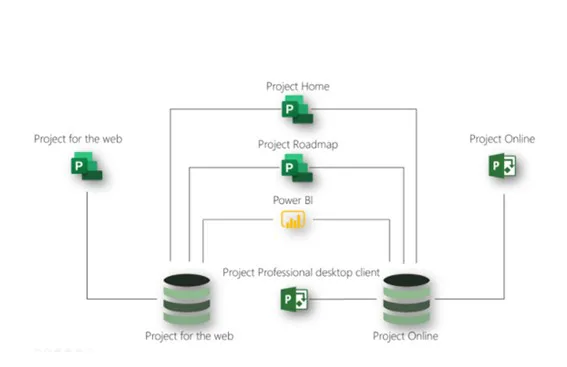
The Project for the Web was developed based on and mainly to work with the architecture below:
03Project Online
The Microsoft Project Online is a more complete solution for portfolio management and organization projects. It allows monitoring of work and project costs remotely, facilitating access to project reports.
The main features of Project Online are:
Resource management: In Project Online, in addition to managing labour resources (resource pool) it is also possible to control material resources and costs.
Time Management: Project Online allows scheduling optimization based on project information, resources, or costs.
Cost management: It is possible to manage the budget by accounting for resources, by cost items or by controlling the budget at project level.
Ease of collaboration: With Project Online the team can collaborate with the project in a practical and agile way through PWA. In addition, you can use standard SharePoint lists to create and share any problems or risks that may occur during the project.
Customization of Reports: Project Online allows the creation and customization of various reports. For customization and customization of reports, we recommend hiring a specialized consultancy to ensure data integrity.
04Conclusion
The Project for the Web is still considered a simplified version of Project Online, which only allows for simpler updates in the projects. Although functional, it has restrictions on the possibility of customization and functionality. Because of the simplicity of Project for the Web, it is usually used for presentations or meetings where there is no need for further detailing of the project information.
Project for the Web does not replace Project Online but adds new features to Microsoft's project environment.
If your company needs a more complete tool for project management, with greater possibility of configuration, customization or even customization, the most suitable tool to meet this need is Project Online.
To learn more about Project for the Web, Project Online, learn more about PPM, or how to optimize your company's project management, please contact us.
Original content from the MLPro editorial library, fully preserved and translated for the English website.
