
What you will find here
Explore the Project Online functions covered in this article, including schedules, resources and project progress tracking.
Managing projects involves dealing with tight deadlines, stakeholder expectations, diverse teams and challenges that arise at any time. And often what is lacking to achieve better results is not effort. It's a tool. O Microsoft Project Online is a corporate solution that offers visibility, control and integration for those who lead projects. With it, managers have access to centralized information, updated and aligned with the strategic goals of the company. In this article, you will understand how Project Online works, why it has been adopted by companies that seek more maturity in project management and how it can make a practical difference in everyday life.
01When the routine gets out of hand, the problem is not always the team.
If you have been through situations where the schedule does not close, the tasks run over and the resources never seem to be available, know that this is not rare and often has nothing to do with the team's competence, but with the lack of visibility and structure. That's why Microsoft Project Online It has become so important to companies that want to grow with organization and focus. With him, you can do it. plan, track and adjust your projects Safe, from anywhere.
02What is Microsoft Project Online?
The Project Online is a cloud hosted Microsoft solution and focused on the project, program and portfolio management (PPM). He's part of the Microsoft 365 and is connected to the main tools of the ecosystem, such as Teams, Outlook, Excel, Power BI and SharePoint. It is ideal for companies that manage several simultaneous projectsThey need to align people, resources and goals, and want to avoid rework and loss of productivity. In addition to Project Online, Microsoft offers other management support solutions such as Planner Premium (Project for the Web), which is best suited for operational demands and smaller teams, and the Project Professional, focused on local and individual use, without the collaborative resources of the cloud. Each of these tools meets different stages of maturity in projects and MLPro can help your company choose the most appropriate path.
03Why does Project Online facilitate the life of the project manager?
- Planning with more clarity and organization
When starting a project in Project Online, one of the manager's first tasks is to build the schedule. The tool offers dynamic Gantt chart, where it is possible to organize tasks, set deadlines and visualize important milestones.
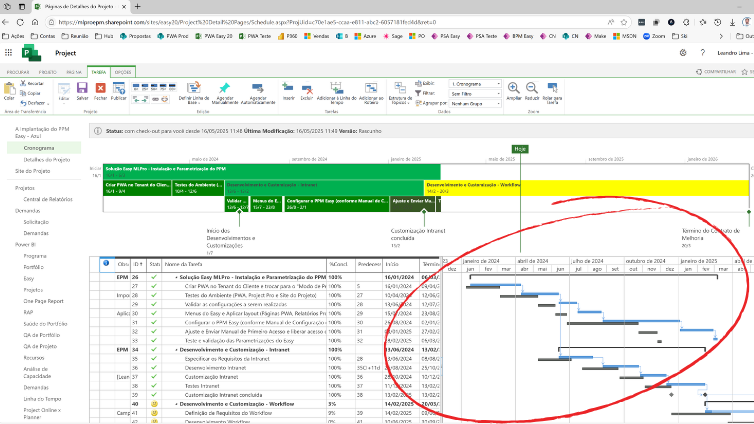
This type of visualization facilitates the understanding of the entire project flow, clearly showing which tasks are critical and where delays may occur. In addition, there are baselines that can be saved for comparison with real progress. This functionality helps to identify deviations at the beginning and to adjust the route with agility.
- Strategic resource management
Distributing tasks correctly among team members is a common challenge. With Project Online, it is possible allocate human, financial and material resources directly on the schedule and track its use in real time.
The tool allows:
- View overloads or idleness
- Reorganize allocations based on availability
- Control costs by resource and by task
These features ensure more balanced management, avoiding delays and keeping the productive team within the available capacity.
- Real-time indicators, reports and dashboards
Making data-based decisions is essential for good project management. Therefore, Project Online offers native reports and the possibility of direct integration with the Power BI to create custom dashboards.
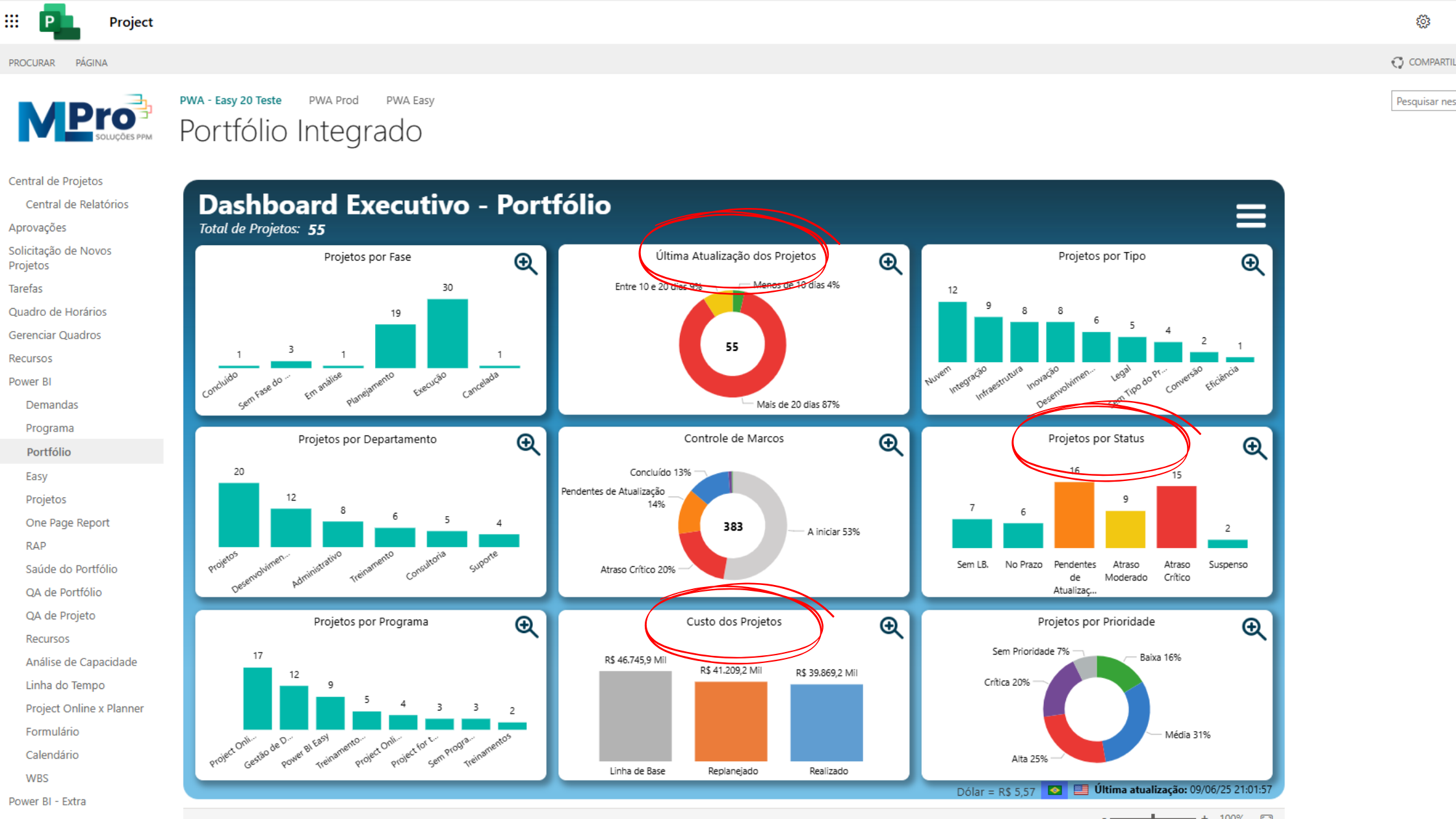
These reports may show:
- The progress of tasks and deliveries
- The comparison between planned and performed
- The accumulated and expected costs
- The use of resources per period
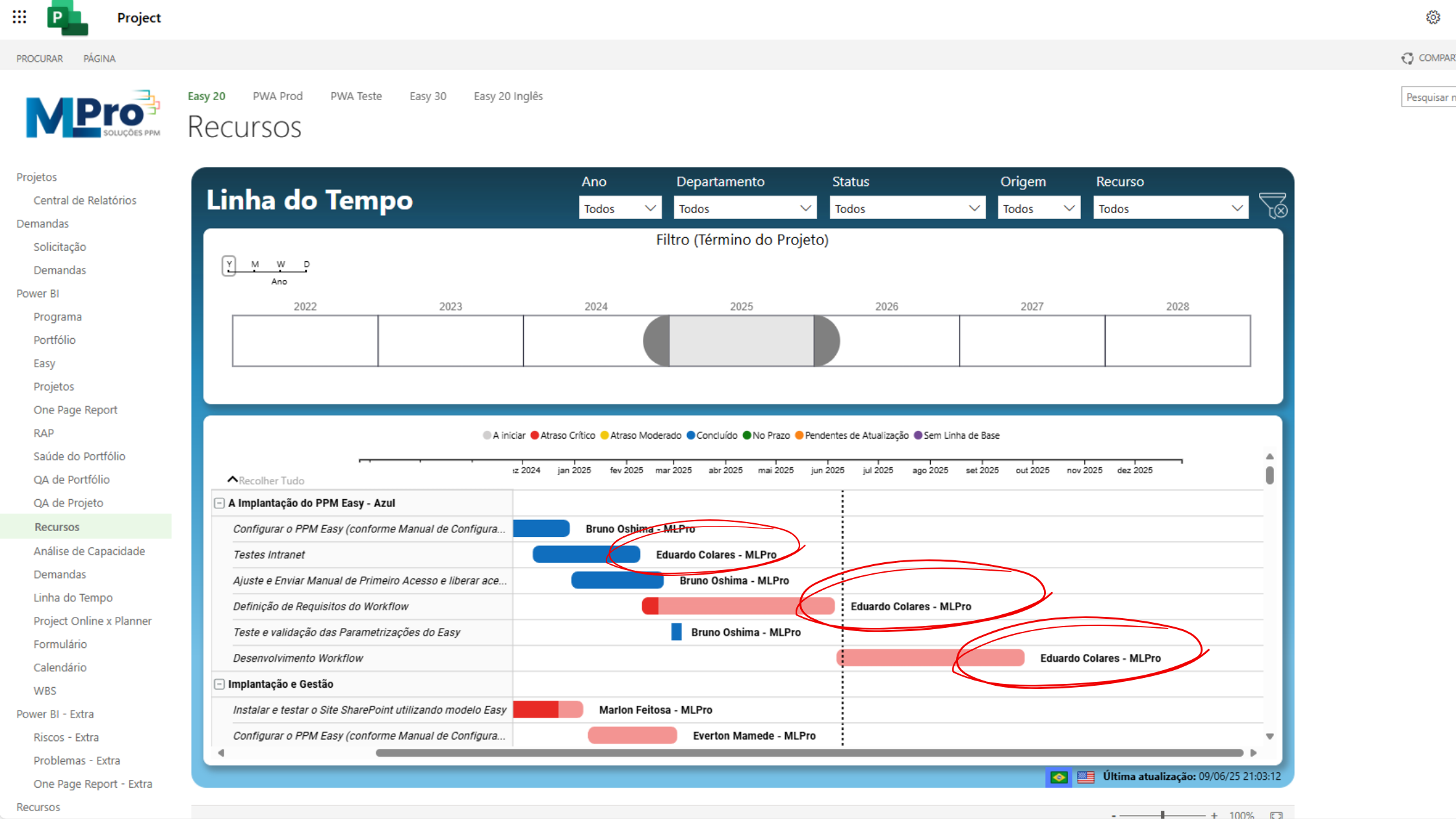
All this helps to anticipate risks and justify decisions with transparency for stakeholders.
- Different views for each need
Project Online allows you to switch between multiple views, as:
- Gantt Graph (Coronogram in Bars)
- Kanban Table (task board)
- Sheet (grid)
- Resource graph
- Network Diagram (network diagram)
These views are adaptable to the different profiles that interact with the project: from manager to team member, from analyst to executive. Each can access the information you need, in the most useful format for your daily life.
- Scaleability and integration with Microsoft 365
As part of Microsoft 365, Project Online connects with all ecosystem tools. This allows, for example, a manager to comment on a task in Teams, attach documents to SharePoint and send an Outlook status update, all related to the same project. This one. integration reduces rework, centralizes information and improves communication between areas. In addition, Project Online is scalable. A company can start with few users and expand gradually as demand grows. Many prominent organizations, such as Alive, Tiger, Ypê and Camil, they already use solutions based on the Project with the support of MLPro, precisely seeking more clarity, standardization and governance in the execution of their projects. What the Project Online
04What does Project Online deliver in practice?
By adopting Project Online, your company wins:
- Greater control over deadlines and deliveries
- Better distribution and use of resources
- Clear reports for decision making
- Less rework and more team alignment
- Full visibility of the project portfolio
It is a tool that unites operation and strategy, helping the project manager to get out of reactive mode and assume a more analytical, decisive and connected role to organization planning.
05Why do so many companies choose MLPro to transform their project management?
A MLPro is Microsoft's certified partner, specializing in the implementation of solutions aimed at project management, programs and portfolios. We are. for more than 20 years on the market and we already support over 75,000 projects with Microsoft solutions.
We offer:
- Deployment of tools such as Project Online, Project Professional, Planner Premium and Power BI
- Customization of the solution for the day to day of each company
- Practical training and support with certified experts
Our work goes beyond technology. We helped your company design a new way to work with projects, focusing on efficiency, visibility and result.
06Ready to turn your management?
If you want more control, clarity and alignment in your projects, Microsoft Project Online, deployed with the expertise of MLPro, may be the next step of your company.
Schedule a conversation with one of our experts and see in practice how we can help. Click here to schedule your schedule!
Original content from the MLPro editorial library, fully preserved and translated for the English website.
