
What you will find here
Review how task types and peak units affect work, duration and resource allocation in the archived Project 2010/2013 examples.
In this Post we will see how Pico works in Project 2010/2013.
In the Project, there are 3 types of activities: Fixed Unit, Fixed Duration and Fixed Work. For Work and Duration the Project will use the PICO field to not lose the percentage placed in the Assignment Unit.
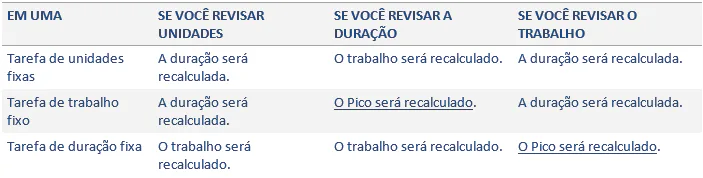
The old calculations continue to be valid and one is changed:
Fixed Work:
- When the assignment units are changed, the Project will recalculate the duration.
- When you change the work, the Project recalculates the Duration.
- But if you change the duration, the Project will recalculate the PICO and the assignment units will not be affected.
Fixed Duration:
- When you change the assignment units, the Project recalculates the work.
- When you change the Duration, the Project recalculates the work.
- But if you change the Work, the Project will recalculate the PICO and the assignment units will not be effected.
From version 2010 onwards, the formula is: Work = Duration x Peak
Pico represents the maximum percentage of the resource allocation unit that will be required over the duration of the task.
For example:
Consider these three tasks and their types:

Change Display Mode to: Use of the Task (Where we can see the value of Pico, in resources):

To verify changes in the case of a task with Fixed Duration, we will make changes at work. Let's change from 4:00 to 32:00 the work of Activity 1:

When doing this action, the change is the Pico field, which indicates that the resource will need twice the initial availability, because the work has been doubled.
To check Fixed Work, we will make change in duration. Let's switch from 3 to 5 days the duration of Activity 2:

Pico decreases and so does working hours. The maximum that the specified resource will need to be assigned is now 60%.
To check Fixed Unit, we'll change the work from 32 hours to 4:00 hours in Activity 3. The duration shall be recalculated:
Before:

Then:

Project Porfessional - EPM - Peak
The Attribution unit does not change, the Pico changes. So the rule is:
Original content from the MLPro editorial library, fully preserved and translated for the English website.
