
What you will find here
Read the archived announcement of the new Microsoft Planner and its plans to bring task management, project work and AI together.
With the advancement of technology, artificial intelligence is increasingly present in our work environment, and consequently, the tools we use in our daily lives should support us so that we can remain productive.
Recent research has revealed that 70% of employees would delegate as much work as possible to the AI, but they mentioned that current collaboration tools are not aligned with how their teams prefer to work.
In order for them to be more efficient in their work, they mentioned that they would need a unique and intelligent application to carry out their activities and manage their projects.
To meet this need Microsoft will launch a new unified AI-assisted solution called New Planner for work and project management.
In this article, we will bring you the initial information on this launch and will soon bring you more detailed information about this new platform.
01Planner's changed and we'll show you how to get the best out of these changes.
With the constant evolution of Microsoft management tools, understanding changes in Planner is essential to ensure that your company continues to operate efficiently and visibly. Ignoring these updates can lead to resource allocation failures, ill-defined tasks, and loss of schedule predictability directly affecting PMO performance.
In addition, many managers face practical difficulties when they do not adapt their processes to what is new on the platform. Simple errors, such as not properly configuring tasks or not understanding new features, can compromise the entire strategic planning of a project.
02What Microsoft New Planner should be like
New Planner should contemplate the simplicity of Microsoft To Do, the collaboration of Planner, features of Project for the Web and the intelligence of Microsoft Copilot, allowing the management of tasks, individual plans and work teams, as well as project management.
New Planner is expected to have a new and more intuitive interface facilitating navigation and contributing to a more efficient workflow.
New Planner was created based on Microsoft Power Plataform and will allow custom Power BI reports and stream creation through Power Automate. In addition, it will connect to Microsoft Viva Goals by connecting its key goals and results (OKR) , giving greater visibility to the strategic information of the company's projects.
New Planner will allow integration with other Microsfot 365 experiences such as Microsoft Loop, Microsoft Outlook, Viva Goals and Microsoft Teams.
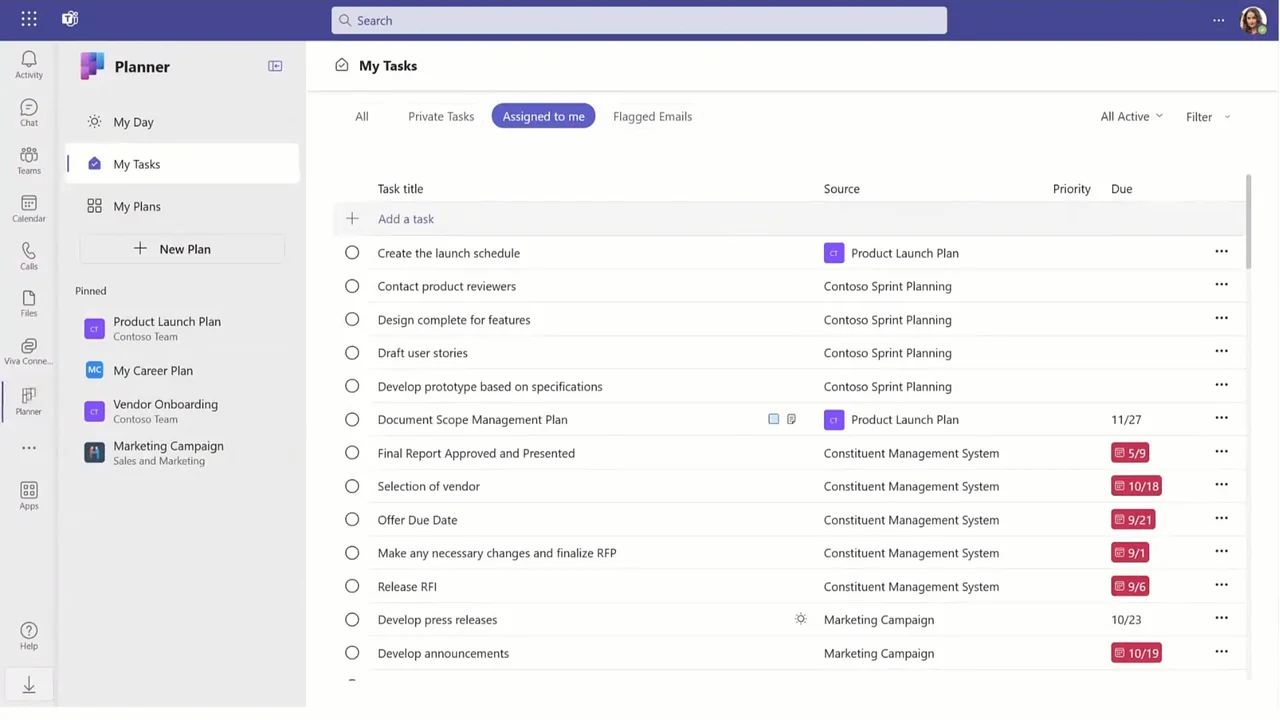
Improved integration with other Microsoft ecosystem tools such as Teams and SharePoint will allow more practical collaboration between the project team and more integrated project management.
The forecast is that the web version should be made available at the end of 2024.
With New Planner you can find and manage tasks, lists and projects in a practical and agile way. In addition, you will have features such as agile sprint planning, team workload and task history.
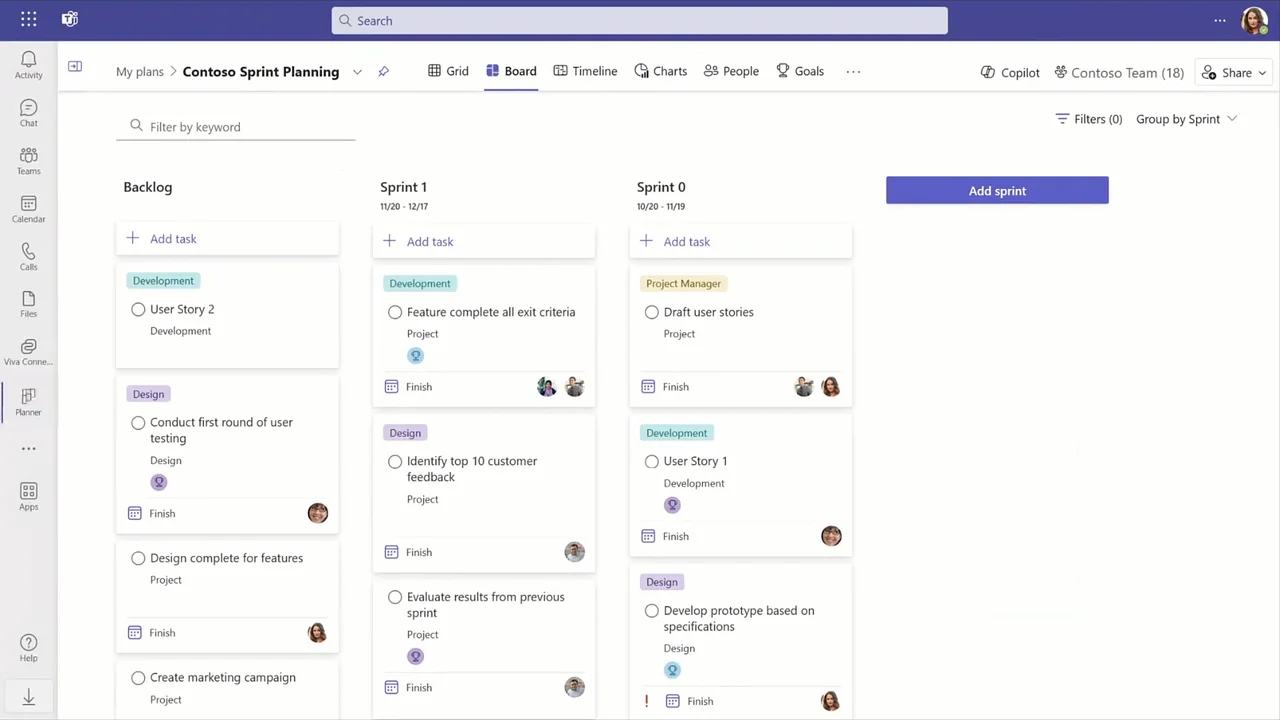
Personalization is the key to meeting the various needs of users. At Microsoft New Planner, users will have the ability to customize their workspaces according to the specificities of their projects. This includes the ability to create custom fields, categories and tags, providing greater flexibility in the organization of tasks.
One of the most expected features of Microsoft New Planner 2024 is the incorporation of artificial intelligence for task optimization. The AI will analyze work patterns, identify areas of improvement and provide valuable insights to improve project management efficiency. This will not only save time, but will also ensure that teams are always working as intelligently as possible.
Still in 2024, the AI resources will be integrated into New Planner, thus allowing the creation of new plans and goals, allowing the monitoring and status and reaction to changes during the implementation phase of the projects.
03Update: Artificial intelligence is already reality in the new Planner
In 2025, the promise came true: the new Planner now has artificial intelligence-based resources through Project Management Agent. This AI acts as an assistant within Planner, suggesting tasks, identifying risks, predicting delays and helping managers make faster and more informed decisions.
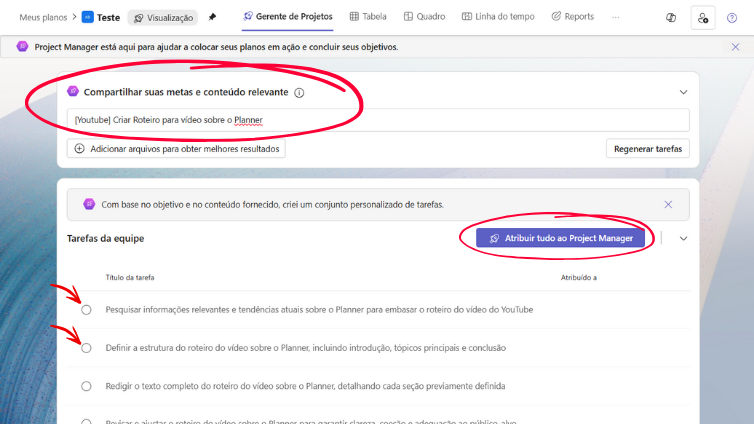
If in 2024 the novelty was the announcement of the AI, it is now part of the day-to-day of those who use Planner as a strategic tool for project management.
04And what license to use?
Regarding licensing, Microsoft New Planner is part of Microsoft 365, which means customers with a Microsoft 365 subscription can use it without additional license acquisition. Access to premium resources will require paid subscription.
New Planner's additional premium features include:
- Sprints;
- Copilot in New Planner;
- Views with priority detailing of schedules, people, custom fields and task dependence;
- Baselines;
- portfolio;
- Vision of People and Goals
The existing Project Online Plan 1 license will become the new Planner Premium license but Microsoft plans to share more information about Copilot prices and details soon.
It is noteworthy that with the arrival of the New Planner, the Microsoft Project, and Project Online will not be discontinued and will continue to support existing customers and also new customers.
05Where Planner fits into the Microsoft ecosystem
Microsoft Planner is ideal for teams that need simpler and more collaborative task management. It stands between To Do and more robust tools such as Project Online or Planner Premium (Project for the Web). That is, it is an excellent choice for organizations that seek agility in daily life without giving up organization and visibility of deliveries.
06Turn Planner changes into real results
The new Microsoft New Planner, promises to be a revolution in the way teams work, combining flexibility, simplicity and connectivity allowing a more advanced, integrated and adaptable planning experience by collaborating to make teams more productive and efficient.
We will wait for the launch of New Planner to check all the features available in the product.
For more information about this launch and how to optimize your company's project management please contact us.
07You want support to apply the new Planner to your company?
Want support to set up the new Microsoft Planner in your company? Talk to our Microsoft Project experts and make sure your team is ready to take advantage of all the features of the new version. Schedule a presentation!.
Original content from the MLPro editorial library, fully preserved and translated for the English website.
