
What you will find here
Project Online retires on September 30, 2026. Learn what becomes unavailable, compare transition paths and organize your migration before the deadline.
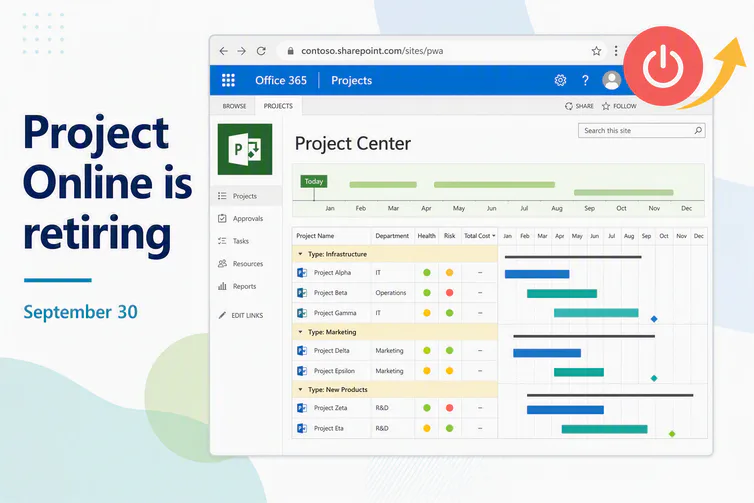
Project Online now has a firm retirement date. Organizations that still keep schedules, documents, lists and history in the service must treat migration as a time-bound project, not routine maintenance. Microsoft confirms that Project Online retires on September 30, 2026.
After retirement, projects and associated service data will no longer be accessible. Organizations should not assume that content will automatically move to Microsoft Planner or another platform. Each company needs to inventory its environment, preserve the required information and complete its transition before the cutoff.
The impact goes beyond schedules. Project documentation, risks, issues, lists, reports and sites connected to the environment must also be included. For organizations with audit or compliance requirements, preserving those records is part of business continuity.
01What belongs to Project Online and what remains available
Start by separating resources that are often mistaken for a single environment:
- Inside Project Online: PWA, projects, sites created under that address, lists, documents and reports tied to the service.
- Outside Project Online: standalone SharePoint sites, such as a corporate intranet, that do not depend on PWA.
- Separate products: Microsoft Project desktop, Project Server Subscription Edition and Microsoft Planner are not part of the Project Online retirement.
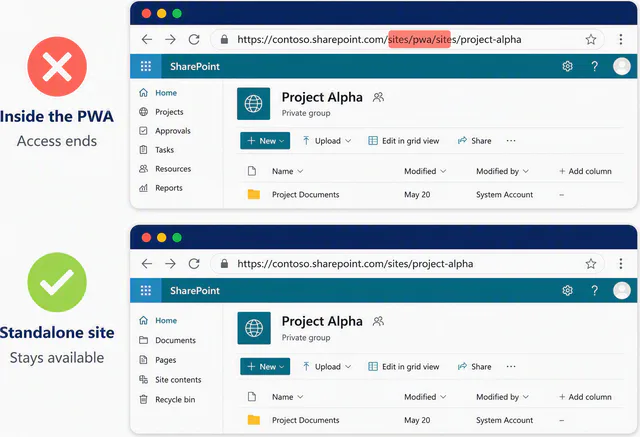
There is a practical check for project sites: review the full URL. If the site sits below the PWA address, include it in the migration scope. If it sits outside PWA, confirm that it is independent with the SharePoint administrator before removing it from the inventory.
02Transition summary
| Stage | Goal | Practical application |
|---|---|---|
| 1. Assessment | Map the environment and owners. | Identify PWA, projects, sites, lists, reports and integrations. |
| 2. Inventory | Determine what must be preserved. | Separate PWA-dependent content from independent resources. |
| 3. Destination | Decide where each information type will live. | Assess Planner, Project Server or a Project, Planner and PSA Easy model. |
| 4. Migration | Move and validate data before retirement. | Run controlled batches, verify results and preserve traceability. |
| 5. Operations | Resume publishing, collaboration and reporting. | Train users and monitor the new governance model. |
Prefer a visual explanation? Watch the complete MLPro demonstration:
 Play video: Project Online retirement: what happens and how to move forward
1. What happens on September 30, 2026
On the official retirement date, Project Online will no longer be available. This is not limited to losing editing capabilities. Microsoft states that customers will no longer be able to access projects or associated data within the service.
Existing environments continue to operate with support until retirement. Use this period to identify dependencies, create controlled backups, test the destination and finish the transition. The final date should not be treated as the starting point for migration.
Essential point: Microsoft advises organizations to back up projects and complete the transition before retirement. Plan the migration as an organizational responsibility instead of relying on an automatic transfer.
2. What becomes unavailable when the service retires
The inventory must cover everything that supports project traceability, not only the schedule file:
- Schedules and project data published in the environment.
- History and records required for audits.
- Documentation stored in sites connected to PWA.
- Risk, issue and decision records.
- Lists, reports and integrations that depend on the service.
- Project sites created inside the PWA structure.
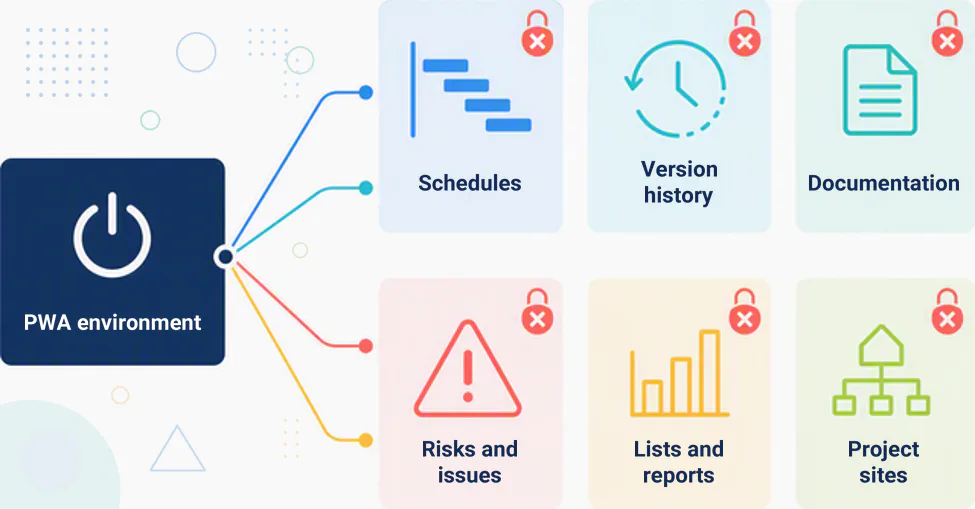
For audited teams, these records prove decisions, deadlines and accountability. Losing access can make it impossible to demonstrate how a project evolved, turning migration into a compliance matter rather than a minor operational inconvenience.
How to identify whether a site belongs to PWA
Open the project site and inspect its URL. When the PWA address appears before the site path, treat the site as dependent on the environment. When the URL points to a standalone SharePoint site collection, the site may remain available, but confirm that condition during the assessment.
3. Which paths to assess after Project Online
There is no single destination for every organization. The right choice depends on project scale, governance requirements, infrastructure strategy, data volume and available time.
Microsoft Planner
Microsoft Planner combines task management with premium capabilities including dependencies, timelines, baselines and portfolios. It can be a strong destination when its operating model fits the organization, but it requires a fit assessment and data mapping. It should not be treated as a direct copy of PWA.
Project Server Subscription Edition
Project Server Subscription Edition is Microsoft's option for organizations that require advanced PPM or a closer match to Project Online in their own infrastructure. The path introduces server, SharePoint Server, operations and internal maintenance requirements that must be included in cost and timeline analysis.
Microsoft Project supported by PSA Easy
Another option keeps schedules in Microsoft Project and replaces the supporting environment. In this scenario, PSA Easy brings together projects, documents, risks, issues and reports while enabling a hybrid Project and Planner operation based on each initiative's needs.
4. How PSA Easy supports post-migration operations
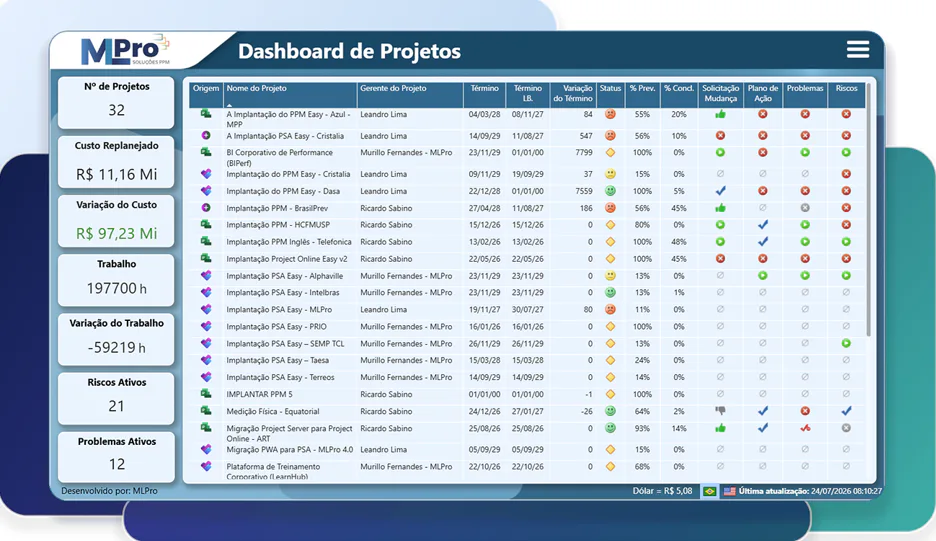
PSA Easy is installed in the customer's Microsoft environment and operates under the organization's own access and security policies. Teams can preserve their planning routine in Project, publish the data and feed reports without manual consolidation.
Many organizations use more than one scheduling tool. The solution therefore supports projects in Microsoft Project, Microsoft Planner or a hybrid model while maintaining a consolidated portfolio view for the PMO and leadership.
5. How to choose the destination and start now
The decision is both technical and strategic. Four questions help organize it:
- How large and complex are the projects? Dependencies, resources, costs and detailed schedules affect the required toolset.
- How much history exists? The larger the archive, the sooner inventory, treatment and validation should start.
- What are the compliance requirements? Audited environments need controlled preservation of traceability and evidence.
- How much time remains? The calendar determines what can still be implemented, tested and adopted before retirement.
Start with the inventory. Identify owners, confirm who depends on each data set and give documents, lists and integrations the same priority as schedules. Then run a migration proof with a representative group before moving the complete portfolio.
08Official sources and related content
The date and impact described in this article were checked against the Project Online lifecycle page and the official Microsoft announcement, updated in March 2026.
MLPro assesses the current environment, defines the destination for each information type and runs the transition with its own automation tools.
Talk to a specialist → Consultative support on WhatsAppOriginal content from the MLPro editorial library, fully preserved and translated for the English website.
