
What you will find here
Explore how Microsoft Project and Teams integration connects project planning with team communication and collaboration.
Learn how to unite real-time planning and collaboration with integrate Microsoft Project and Teams, and find out if this solution is effective for the day-to-day life of your team. Integrating Microsoft Project and Teams is an idea that looks perfect on paper. But does it work that well in practice? Today, with companies increasingly focused on centralizing information and speeding up communication, finding tools that really connect makes all the difference.
The Microsoft Teams has become the sweetheart of many teams for meetings, conversations and file exchange. The Project is a reference when it comes to project planning. Bringing these two worlds together is tempting. But is the promise to unite everything in one place really fulfilled? Let's find out.
Why can integrating Microsoft Project with Teams be advantageous?
If you've tried managing projects and talking to the team in separate tools, you know how much this can turn into chaos. Integrate tools complementary to Microsoft Project in routine helps to make everything more organized and makes management even more effective, as is the case of Teams The information stays in one place, without having to open ten screens at the same time. Besides, the whole team can keep up with what's going on, without having to ask all the time. Another important point: decisions get faster, because everyone sees updates in real time. In short: less confusion, more agility and communication that actually works.
Centralization of information and gain of agility
When we talk about integrating Project and Teams, the main gain is centralization. Imagine having tasks, deadlines, documents and conversations all in one place. That's exactly what this integration promises to deliver. You open Teams and you see your Project project there, without changing the platform. That makes the information up-to-date for everyone. If someone changes a task or comments on something important, the whole team sees it right away. No lost spreadsheets or forgotten messages in the email. Besides, agility increases greatly. You don't have to chase updates anymore or ask if something's changed. The project moves faster because everyone has access to what they need when they need it. In large projects or teams that work from a distance, this organization makes a huge difference in daily life.
Reduction of communication failures between teams and managers
Nothing worse than a project stopped because of communication failure. With the integration between Microsoft Project and Teams, this tends to decrease a lot. As everything gets centralized, it's much easier for everyone to know what's going on in real time. There are no longer those endless exchanges of emails or messages spread across multiple channels. When there is an update on the Project, it already appears on Teams, and everyone can see, comment and act immediately. With more efficient communication, managers can keep track of project progress without losing important details. And the team doesn't get lost either, waiting for answers or explanations. This transparency helps to avoid misunderstandings and ensures that everyone knows exactly what to do. In the end, this reduces errors and prevents the project from delaying due to lack of alignment.
How Microsoft Project integration works
The integration between Microsoft Project and Teams is very simple and can be done in few steps. First, you need to connect both apps. In Teams, you can add Project as a guide on a specific channel. This allows everyone on the team to access the project directly on Teams without having to open the Project separately. Then the communication between the two becomes automatic. When there are changes or updates to the Project, they appear on Teams. So the team always gets into everything, effortlessly.
Steps to configure integration
Setting up integration between Microsoft Project and Teams is easier than it looks.
- First, you need to ensure that both applications are in your Microsoft account;
- Then open Microsoft Teams and select the channel where you want to add Project;
- Click “+” to add a new tab and choose Microsoft Project from the options list;
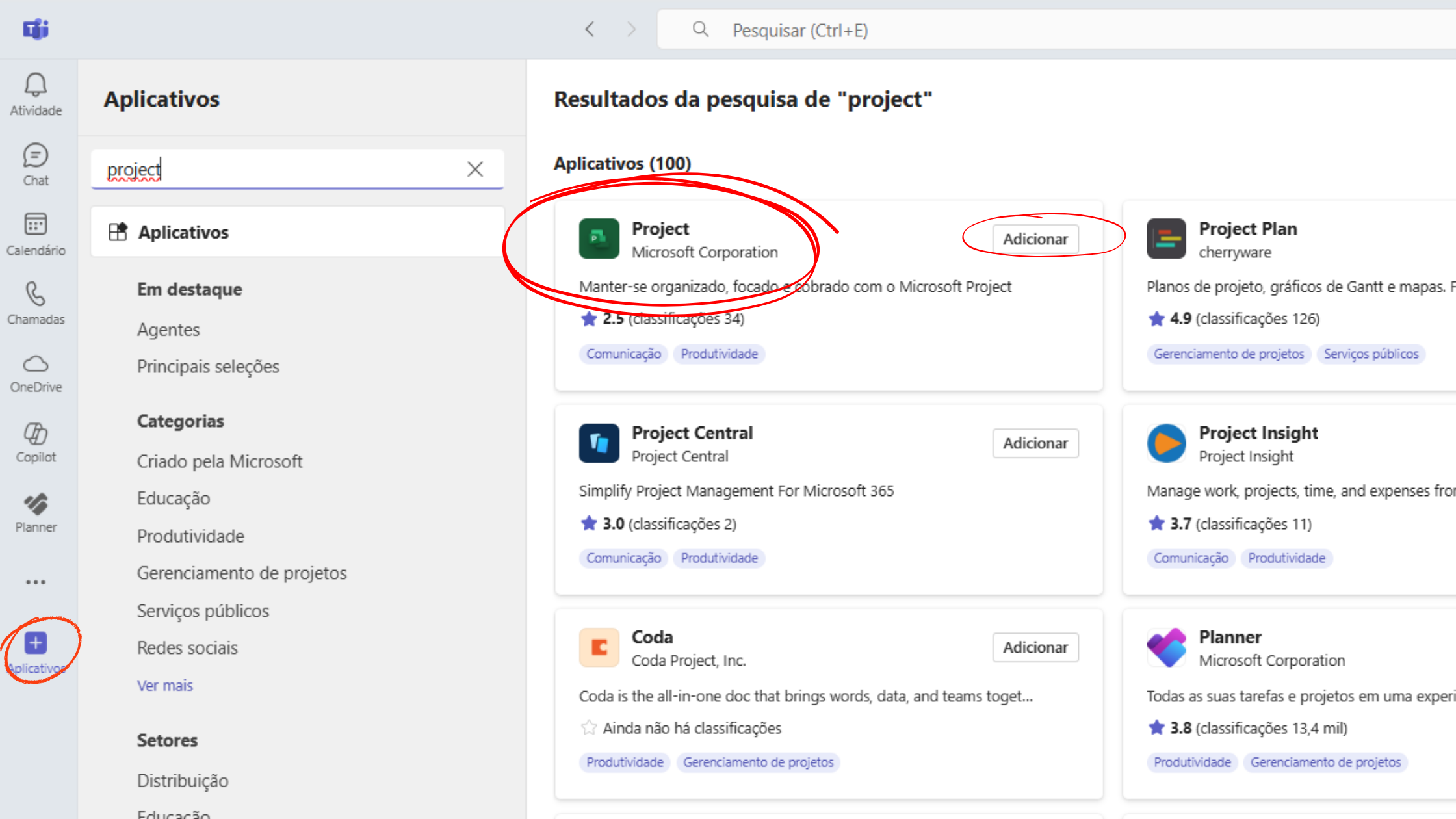
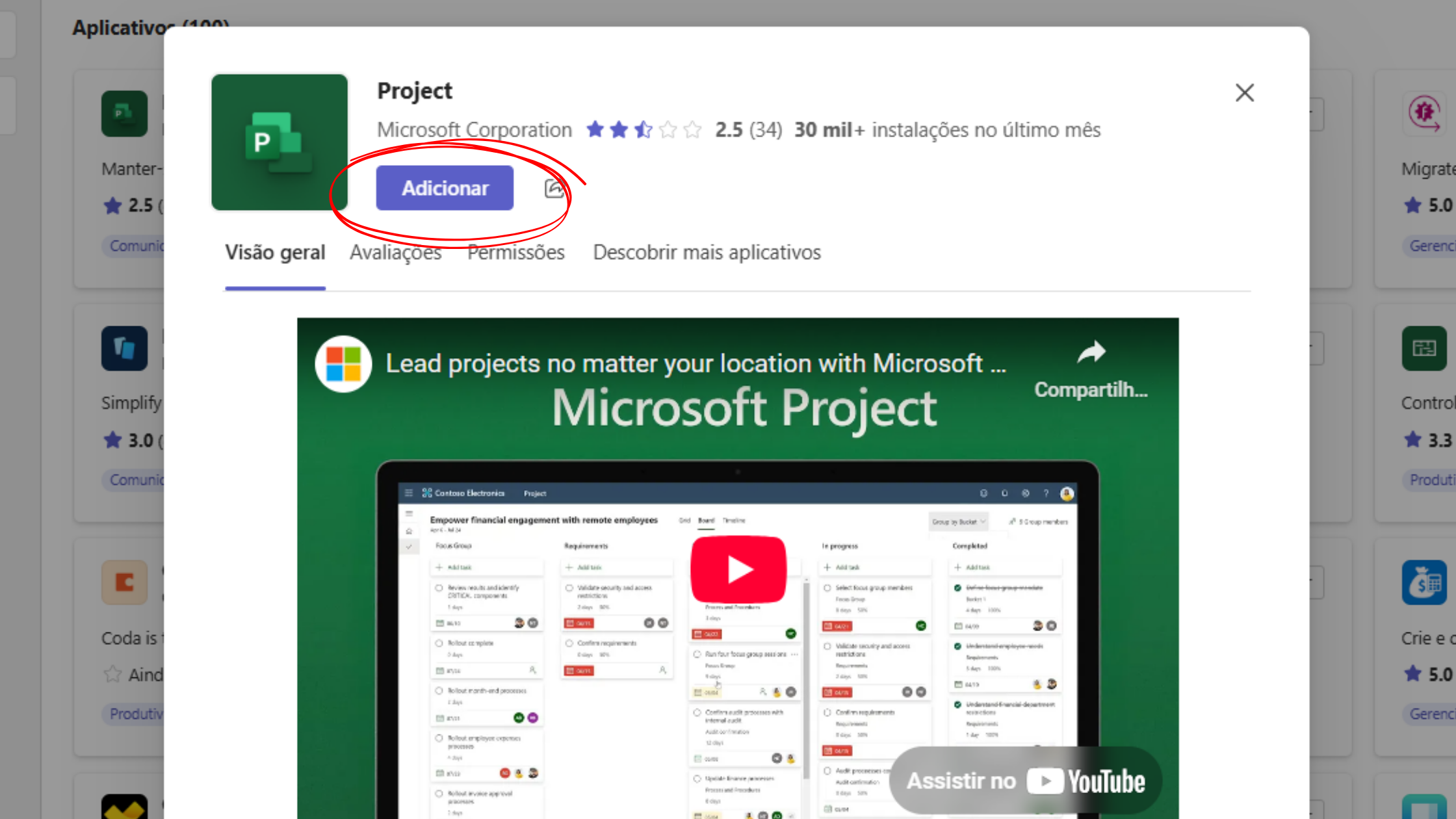
- Now, you just need to choose the project you want to link;
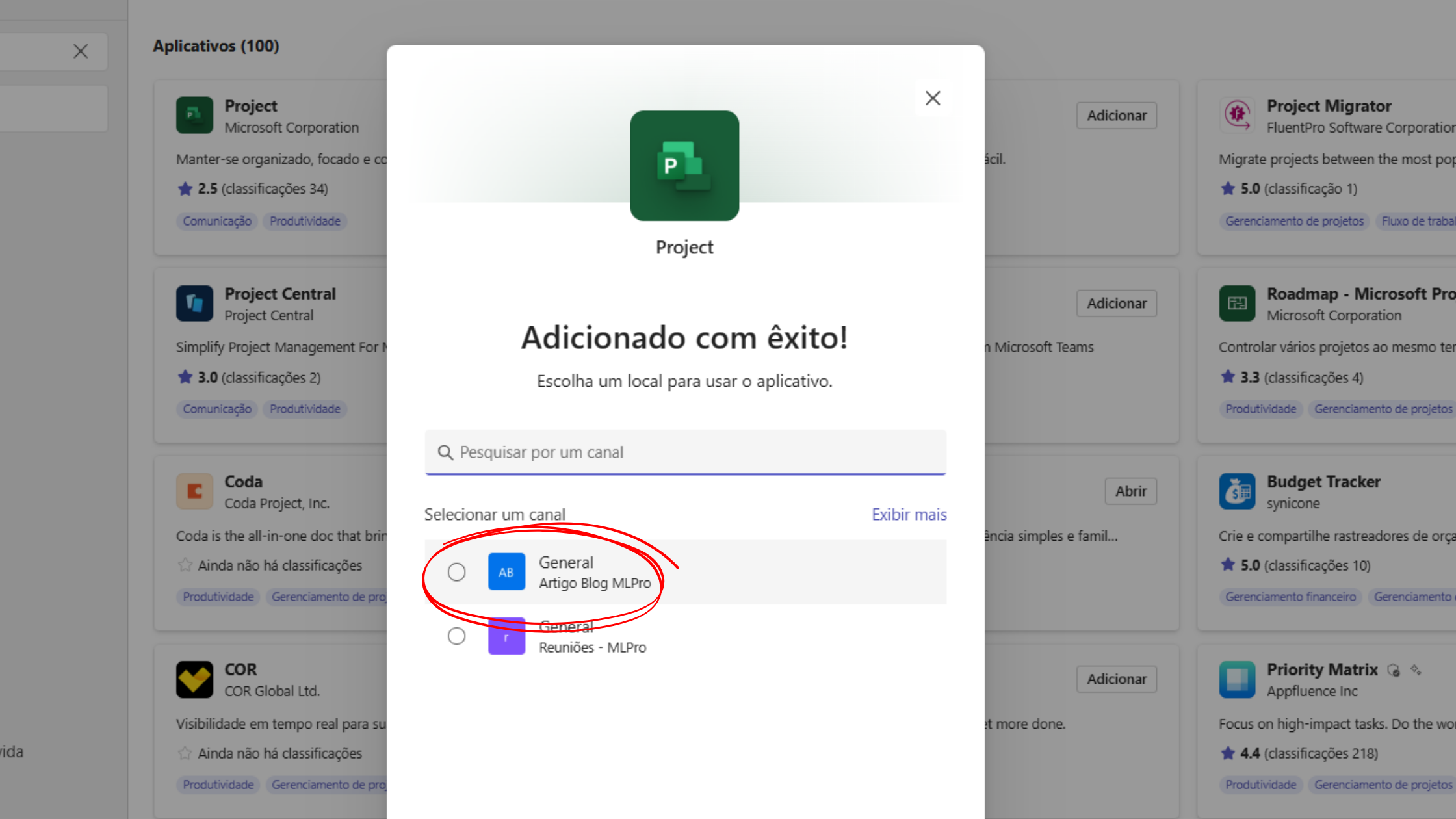
- After that, Project will be available directly on Teams, like a tab inside the channel.
Any update made in the Project will be automatically reflected in Teams, without needing to configure anything else. It's a very simple integration, without major complications. The most interesting thing is that, with this, you can already start monitoring the progress of the project directly in Teams, facilitating teamwork and communication.
Features available after integration
After integrating Microsoft Project and Teams, several interesting features are available to your team. The main one is the project display directly on Teams, without leaving the platform. This facilitates the monitoring of tasks, deadlines and progress of each stage of the project. Also, whenever a task is updated on the Project, everyone on Teams channel is notified, keeping everyone on the same page, avoiding last minute surprises. Another cool feature is the possibility to comment directly on Project tasks within Teams. Thus, communication is more direct and decisions are made more quickly. Integration also improves file sharing. Any Project document can be accessed directly on Teams, without needing email exchanges, making everything faster and more organized.
Strong points and limitations of integration
Integration between Microsoft Project and Teams has many positive points. It facilitates the centralization of information, improves communication and increases agility in project monitoring. In addition, with real-time viewing and automatic notifications, it is easier to keep everyone aligned. But not everything is flowers. The configuration can be a little confusing for those who are not so familiar with Microsoft tools. In addition, integration works best when all team members are really engaged and using the platforms correctly. Otherwise, efficiency may fall.
What better integration delivers
Integration between Microsoft Project and Teams provides a practical way to centralize all project data in one place. Real-time viewing and automatic updates ensure everyone is informed about the progress of the tasks. This makes it easier to avoid confusion, accelerate communication and improve collaboration among team members. But it does not end there, since integration also facilitates the management of tasks and deadlines, increasing productivity and organization on the team.
Which may not work as expected.
Although integration brings many benefits, there are some points that may not work as well. For teams that are not used to using tools such as Microsoft Project or Teams, the initial setting can be a challenge. In addition, if team members are not committed to using both platforms regularly, integration may not generate the expected results. There may also be limitations on some specific features, depending on the version of Microsoft Project you are using.
Is it worth integrating Microsoft Project and Teams into your company?
Integrating Microsoft Project and Teams can be an excellent solution for companies seeking to improve organization and communication, especially those dealing with more complex projects. Integration offers significant benefits, such as centralising information and improving the monitoring of real-time tasks. If your team already uses these tools, the transition will be simpler and faster. However, it is important to evaluate your company's profile before making that decision. This integration is more advantageous for medium to large companies that need constant communication and detailed project monitoring. Times agile and with many projects in progress are the biggest beneficiaries. If that's your reality, it's a sign that you need a project management consulting to achieve even more success. However, if your team is small or the projects are simpler, the implementation effort may not be as advantageous. To ensure success, all members need to be willing to adopt the tools and follow best practices. At MLPro, we specialize in integrating solutions such as Microsoft Project and Teams, ensuring agile and personalized implementation for your company. If you are considering this integration, our team can help you make the most of this powerful combination.
Feel free to schedule an appointment with us at the following link: Microsoft PPM Easy Presentation
Original content from the MLPro editorial library, fully preserved and translated for the English website.
