
What you will find here
Get an introduction to Microsoft Lists, including access and sharing options for organizing information with your team.

Microsoft has announced a new application for its Microsoft 365 suite, the Lists, focused on corporate use. As the name says, the application allows you to create lists, intelligent and ordered for whatever you want, whether to make inventories, create tasks, calendars, schedules, contacts and notes, just to name a few examples.
Once created and shared your list, it is possible to track the progress of activities and tasks. On the market there are several apps for managing lists and activities, some paid, others free, some famous and others not so much. The Lists differential, however, is its native connectivity with other Microsoft applications such as SharePoint, Teams and Excel.
The promise is to solve the problem of having to manage several applications to consult information. You can manage everything by Teams or Microsoft 365 central. Productivity thanks you.
01How to access
To use Lists, you need to have a Microsoft 365 account, whether educational or corporate, with access to SharePoint.
To access, just select the booter . located at the top of any 365 environment page, and select Lists.
Clicking on + New List, the application displays all options:
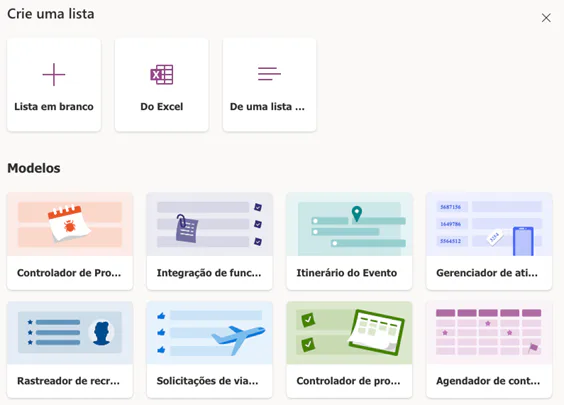
You can create a blank list or use a template Microsoft and customize it. There is also the option to import a list from an Excel spreadsheet.
When selecting the option “From a list...”, you can select a list of a site or team from SharePoint.
Note how the list follows the pattern of SharePoint. It is a trend that Microsoft is applying to its entire ecosystem.

02Sharing
Lists are made to be shared. Lists allows you to share your list with other users and maintain editing and reading control of each user.
To send your list, select your list from the home page and then the option “Share”.
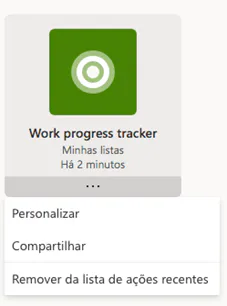
Enter the user's email address.
Choose the type of access granted. There are three options:
- Total control - What? You can set up, edit and share completely.
- Can edit - You can edit or add items. Unable to share.
- Can display - What? Cannot edit or share this list.
After that, just go on grant access.
For more advanced users, it is possible to use Lists to create an application by Power Apps or automate functions with the Power Automate.
In addition to the web version, the app is available for iOS. So far there is no Android version.
To learn more about the features of the Microsoft 365 suite, Project Web, PPM solutions or how to optimize your company's project management, please contact us.
Original content from the MLPro editorial library, fully preserved and translated for the English website.
