
What you will find here
Review the archived guidance on updating task progress with E3 and E5 access, including the permissions described at the time.
For better collaboration, users of Microsoft 365 with E3 and E5 licenses can update the progress of the task, or ""completed" from a task assigned to them in any project they are part of without a Project license.
Users need to be part of the Office 365 group of the project in order to open and update the progress of the task.
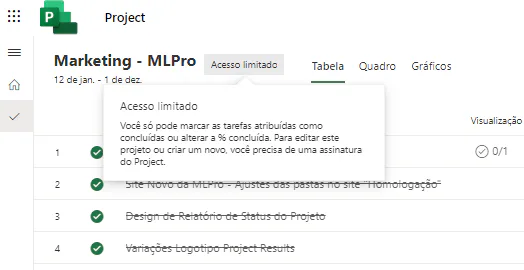
When a licensed user of Microsoft 365 E3 or Microsoft 365 E5 which is part of the project to open the project, it will see the project page as shown below. "Limited Access" will be shown next to the project name to indicate that the user can only update the progress of the task assigned to it.
The experience of updating the “% completed” field of a task for licensed users of Office E3 or E5 will be as follows:
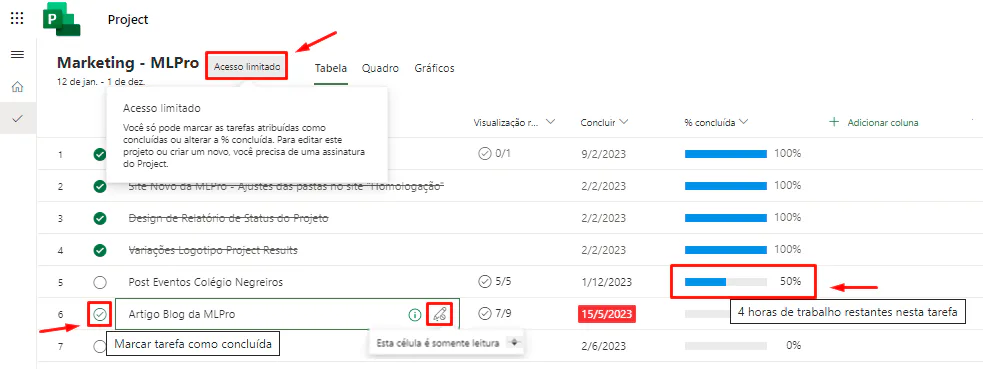
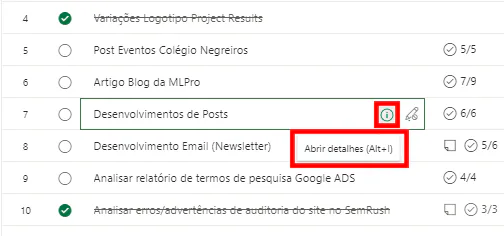
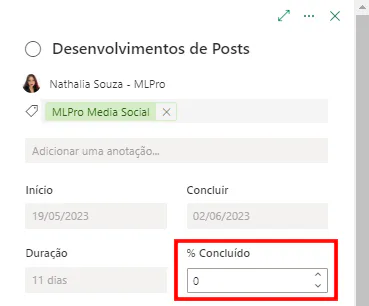
There are no changes in the experience for users with different licenses from E3 and E5.
What kind of license does the user need to update the progress of the task assigned to him?Only users of Microsoft 365 and Office 365 E3 and E5 can update the field "%completed" for tasks assigned to them without a Project license.
Can an E3 or E5 user update the field "%completed" for tasks assigned to any other project member?No, they can only update the progress of the task assigned to them.
If you are interested and want a product presentation, please schedule an appointment with us at the following link: Microsoft PPM Easy Presentation.
IMPORTANT: Licensing reduction for Project for the Web in March 2024, check update.
Original content from the MLPro editorial library, fully preserved and translated for the English website.
