
What you will find here
See how automated project status emails share progress information with project managers and other stakeholders.
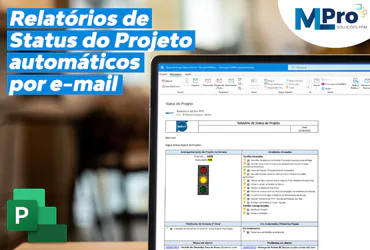
In our last articles on how to manage problems and how to manage risks in Project Online , we talk briefly about the personalized reports created and offered by MLPro, including the status reports of the automatic project by email, which we will talk more about in this article.
MLPro has developed an automated email report that allows easy visualization of all important points of the project through the lighthouses, icons and organized information, it is extremely useful and practical to keep the resources involved always aware of how the project is in general, and the best, without them having to manually consult the Project Website. The Project Status Report contains the following information:
01The origin of the problems
- Follow-up of the Project at the Week;
- delayed activities;
- End of Week (7 days);
- In progress / Next Steps;
- open risks;
- open problems;
- Request for Changes;
- Action Plan;
- Logbook;
Below is an example of the project's automatic status report:
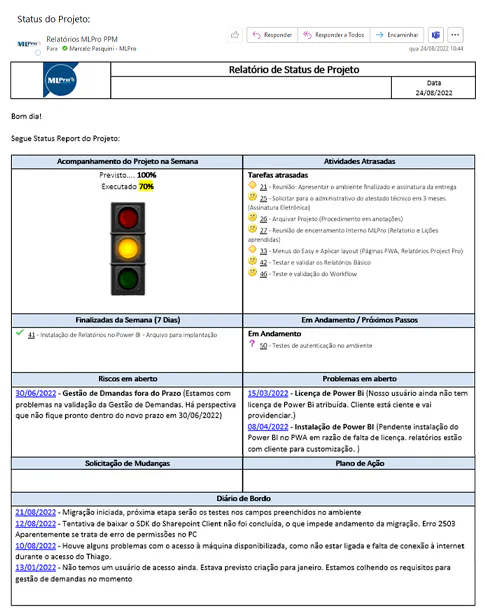
This information is registered on the project website to report the progress of the projects and was organized in a single status report to be sent to internal or external customers.
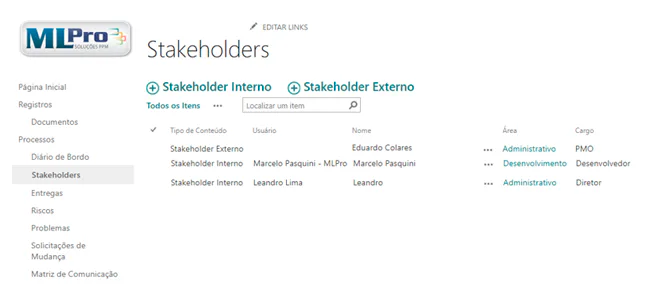
The project manager can register those involved as internal or external stakeholders. And you can program the automatic sending of this report from a specific date for each of them. In addition, it is also possible to choose the reporting frequency.
02How to configure Status reports?
The first thing the project manager should do is register the stakeholders of the projects. The stakeholders can be internal (e.g. project team, board, project manager) and external (clients, customer team).
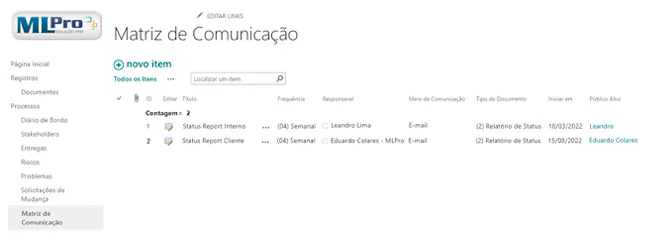
After registration the project manager must access the Communication Matrix and configure according to the need of the project. The project manager shall inform the title, the frequency, the sending person, the means of communication, the type of document, the start date of the shipment and the target audience.
In the example below, we registered two being reports being one for internal validation submission and another that would be sent directly to the external client.
03What benefits does the Project Status Report bring to your company?
The project manager is responsible for efficient communication during the project, and should make the main stakeholders aware of possible deviations from deadlines, problems, risks or even the latest achievements or next steps to be carried out.
With the use of the Project Status report it can easily transmit this information to the project's main stakeholders.
Among the main benefits of the report we can highlight:
- Increases the quality and efficiency of the company.
- Improved communication among those involved in the project.
- It further professionalizes employees.
- Effective planning.
- Better organization.
- Reduces possible complications or budget problems.
- Avoids project delay.
- Increases customer satisfaction.
If you are interested and want a product presentation, please schedule an appointment with us at the following link: Microsoft PPM Easy Presentation.
Original content from the MLPro editorial library, fully preserved and translated for the English website.
