
What you will find here
Compare the roles of Microsoft Project, Planner Premium and PSA Easy in project planning and portfolio management.
Learn how Microsoft PPM solution centralizes data, teams and projects, offering a strategic vision for companies that want performance and control
The Microsoft PPM is Microsoft's solution aimed at companies that want to manage projects in a more strategic, integrated and efficient way.
From initial planning to final delivery, the platform brings together powerful tools to handle multiple projects at the same time, maintaining control over deadlines, resources, budgets and goals, all with great agility and collaboration.
But what exactly does PPM mean? Why is he so important in the routine of great organizations? And what is Microsoft's role in this story? If you are looking for ways to improve the governance of your projects, this content is for you.
01What is Microsoft PPM and what is it for?
PPM comes from Project and Portfolio Management or, in good English, Project and Portfolio Management.
The idea behind the concept is simple: to allow companies not only to conduct isolated projects, but also manage the set of initiatives in a strategic way, prioritizing those that actually generate value.
Microsoft PPM enters as a hub that connects different Microsoft tools and technologies such as the Microsoft Project Professional, Project Online, Planner Premium (Project for the Web), Power BI and SharePoint, to create a complete management ecosystem.
Thus, it is easier to visualize the progress of each project, understand the impact on the whole, make adjustments and keep everything under control.
It's like having an airplane cockpit: you see the general picture, but you can also deepen the details of each flight, or rather, of each project.
Who can benefit from using Microsoft PPM
Companies of all sizes and sectors can take advantage of the benefits of Microsoft PPM. From startups dealing with multiple simultaneous deliveries to large corporations with dozens (or hundreds!) of ongoing projects.
It is especially useful for:
● Project offices (PMOs);
● Technology and innovation teams;
● Marketing or engineering departments;
● Organisations with internal and external projects in parallel.
A MLPro, for example, has implemented this solution in more than 250 companies, supporting more than 75,000 projects. They are numbers that prove the ability of Microsoft Project and Portfolio Management to adapt to different scenarios and needs!
02Benefits of Microsoft PPM for Business
One of the main differentials of Microsoft Project and Portfolio Management is the ability to consolidate everything in a single environment. You can view the ongoing projects, allocated resources, costs, priorities and deadlines, all with interactive dashboards and personalized reports.
This allows managers to quickly identify bottlenecks, risks and deviations, acting before problems get worse. In addition, the allocation of teams becomes more strategic, avoiding overload of some professionals while others become idle.
Want some more? A integration with Power BI It's another differential. It is possible to cross-reference data from different areas and generate valuable insights into portfolio performance.
Faster and more collaborative decision making
Imagine having to approve an urgent project, but no one knows for sure if there is a team available or if the budget still carries a new delivery. With Microsoft PPM, this is no longer a problem.
As information is always up-to-date and available in real time, decisions become based on concrete data, and no longer on achismos. Teams gain autonomy, leaders gain security, and the workflow becomes much lighter and more efficient.
In addition, because it is cloud-based, Microsoft Project and Portfolio Management facilitates collaboration between remote and face-to-face teams, integrating everyone on the same platform.
03Types of Microsoft Project: differences and indications for use
Within the Microsoft ecosystem, there are some options that complement each other, but also have their particularities.
Here's a comparison:
Project Professional (Desktop)
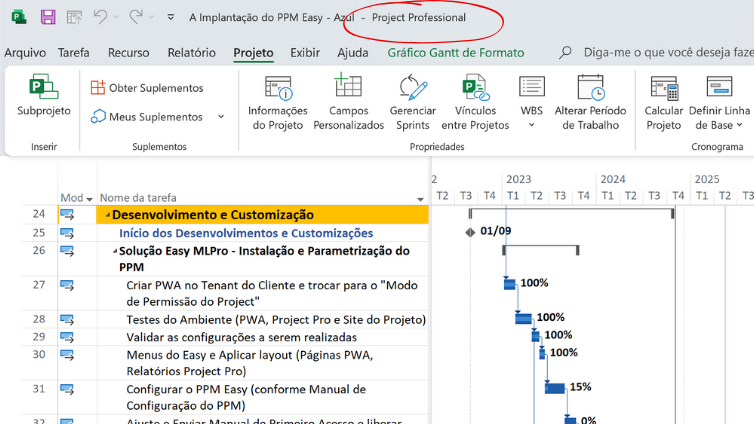
Indication for use: detailed planning of projects, complex schedules.
Platform: application for Windows (installable).
Highlights:
- Classic timing with Gantt, baseline and resource control.
- Ideal for planners focusing on granular control.
- It can be used in isolation or integrated with Project Online.
Limitations:
- He has no real-time collaboration.
- Limited integration with modern tools like Teams and Power Platform.
Project Online (PWA)
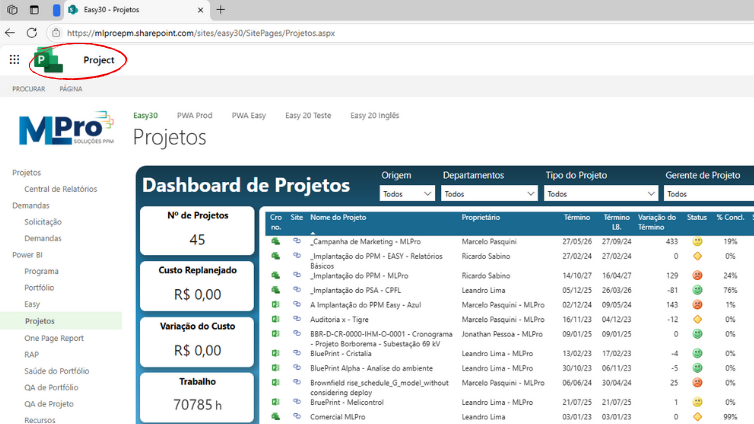
Indication for use: PMOs corporate, portfolio management, advanced control.
Platform: SharePoint Online + Project Web App.
Highlights:
- Project management, programs, resources and demands.
- Allows custom workflows and advanced reports via Power BI.
- Integrable with Project Professional.
Limitations:
- Platform with traditional layout, with Roadmap frozen.
- In the transition phase to more modern solutions.
Planner Premium (Project for the Web)
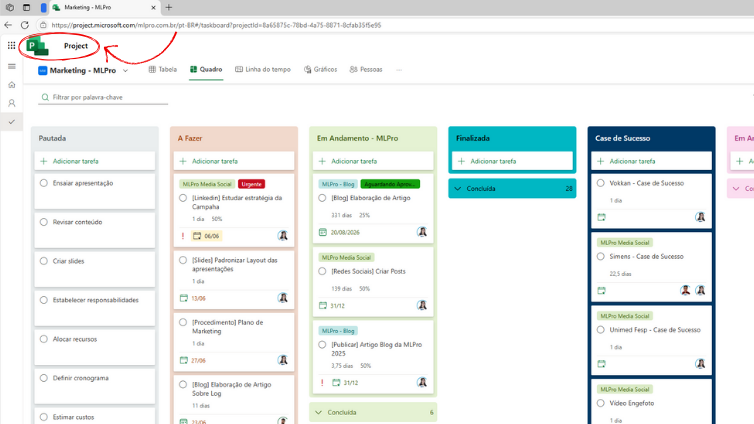
Indication for use: teams that want modern and flexible management.
Platform: 100% Web, based on Dataverse (Power Platform).
Highlights:
- Grid views, Kanban and schedule.
- Native integration with Teams, Power BI, Power Automate and Power Apps.
- Light and collaborative interface.
Limitations:
- It does not cover corporate governance requirements.
- Limited project portfolio view.
- No complex workflows or detailed portfolio management.
PSA Easy (Project Service Automation)
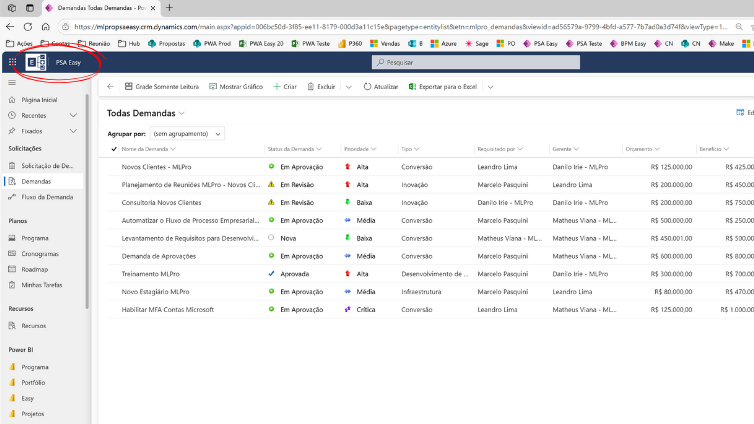
Indication for use: companies providing project-based services
Platform: Dynamics 365 + Power Platform + Microsoft Planner Premium
Highlights:
- Pipeline management, contracts and projects in one place.
- Smart allocation of resources and control of time and expenses.
- Supports commercial, technical and operational teams simultaneously.
Limitations:
- Requires integration with Dynamics 365, which can increase the input cost.
- It is best suited for companies that provide services, not exclusively internal projects.
The choice will depend on the size of the company, the level of maturity in project management and the complexity of the processes.
Specialised consultants such as the MLPro can help in this diagnosis, recommending the best configuration and taking care of all implementation.
04See which version of Microsoft Project best serves your team
Before choosing the ideal solution, it is important to consider the level of control your company needs, the degree of collaboration between teams and maturity in project management. The following table presents a simplified comparison between the main Microsoft solutions, including Basic Planner, which, although not part of the PPM set, is usually the first step of many teams in the organization of tasks.
| Solution | Control Level | Collaboration and Integration | Suitable for: |
|---|---|---|---|
| Basic Planner | Low | Medium | Small teams that just need to organize simple tasks and flows |
| Planner Premium | Intermediate | Advanced | Agile teams seeking simplicity with structure |
| PSA Easy (Project Service Automation) | Advanced | Very advanced | Companies that need to manage projects, contracts and billing agilely |
| Microsoft Project Professional | Advanced | Low | Experienced Project Managers Who Need Detailed Schedules |
| Microsoft Project Online | Very advanced | Moderate | PMOs corporate and portfolio governance companies. |
This information helps to visualize, in a practical way, which solution fits best in each scenario. Evaluating the level of complexity of the projects, the need for collaboration between the teams and the management structure existing in your company is essential to make a more assertive decision.
05Why does Microsoft PPM stand out?
You can even find other PPM solutions on the market, but few deliver the same level of integration, flexibility and support that Microsoft offers. And when this technology is implemented with the help of experts, such as MLPro, the impact on the organization is even greater.
With over 20 years of experience, the MLPro personalizes each deployment based on the real needs of customers, which includes team training, custom reporting creation, integration with legacy systems and continuous technical support.
The result is a more agile, strategic and ready to grow project environment.
Besides, how Microsoft Gold Partner ed Project and Portfolio Management, a MLPro is always updated with the best practices of the market and the innovations of Microsoft itself.
06Ready to transform your project management with Microsoft PPM?
If your company wants to leave the improvisation and take full control of your projects, Microsoft PPM It's one of the best choices.
It goes far beyond a simple task manager: it is a strategic solution, designed to help leaders and teams work with more focus, efficiency and alignment.
And with the right support in implementation, such as MLPro, your company can completely transform the way you conduct projects and achieve goals. After all, those who manage the present well, have much more chance of building a successful future.
Get in touch today and request a product demonstration!
Original content from the MLPro editorial library, fully preserved and translated for the English website.
